Mirror App - Makeup Mirror
o16i AppsBeauty
4.6168.00 Reviews
- Version
- 1.2.3.2
- Installs
- 1.00M
- Age Rating
- Everyone
Screenshots
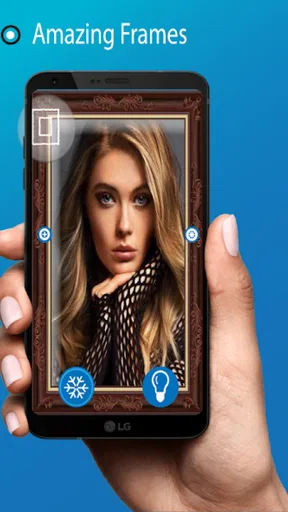
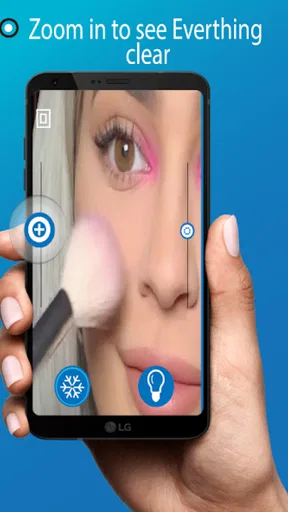
Our Review of Mirror App - Makeup Mirror
 Analysis by Appyee
A mirror app sounds like a small convenience until you reach for a compact and find an empty pocket. I like the idea of turning a phone I already carry into a quick way to check my face, and Mirror App - Makeup Mirror is built around that simple job. It is a beauty app from o16i Apps, with a 4.7 average from around 8.9 thousand ratings and over a million installs. Those figures suggest that plenty of people want a dedicated mirror on their phone, but what matters most to me is whether it makes those brief, practical checks easier.
What a phone mirror can—and cannot—replace
The useful distinction here is between a quick reflection and a full makeup setup. A compact mirror gives you a familiar, always-ready view, while the phone offers a larger screen and controls for brightness and magnification. That makes this app appealing when I want to check a lipstick edge or see whether a stray hair is out of place, rather than sit down to apply a complete look.
It is not a replacement for good lighting, a magnifying cosmetic mirror, or a camera chosen for taking polished photos. The front camera is the practical trade-off: the image depends on the camera in the phone, and the screen shows a camera view rather than the natural reflection of glass. If you are checking fine makeup details, I would use the zoom for a close inspection, then return to the normal view to judge the overall result. Magnification can make a tiny area easier to see, but it can also make small imperfections feel more prominent than they look at ordinary distance.
Network-dependent moments and everyday use
For the core task, the appeal is immediacy: open a mirror app when you need a reflection, adjust the view, and get on with your day. I would not plan a touch-up around a network connection, though. The experience described here centers on the phone’s camera and on-screen controls, while optional purchases are a separate consideration. If connectivity is unavailable or unreliable, it is sensible to have a compact mirror as a backup rather than assume every part of an app will behave the same way in every network situation.
A realistic use case is a quick check before walking into a meeting. I would step somewhere with enough light, hold the phone at a comfortable distance, use the ordinary view to check how everything looks together, and magnify only the detail that needs attention. If the room is dim, the brightness control may make the screen easier to view, but it cannot recreate daylight or correct uneven lighting on the face. I would treat it as a viewing aid, not as a lighting tool that guarantees an accurate makeup match.
Handling a less-than-ideal setting
Phones are often used in awkward places: a crowded workplace washroom, a dim hallway, or a parked car before getting out. In those situations, a phone mirror can save a trip to find a proper mirror, but the environment still matters. Screen brightness can help with visibility, yet reflections from the display, a shaky grip, or poor surroundings can make close work frustrating. For safety, I would only use it in a stationary setting; a mirror app is not something to check while driving or walking through a busy area.
If the view seems unclear, I would first move to steadier light and wipe the front-camera area, then hold the phone still before changing magnification. That simple order helps separate a camera or lighting issue from a control issue. A frozen image can be useful when I need to inspect a moment without keeping my hand perfectly still, but it is not a live reflection while paused. I would unfreeze it before making a final check, especially after moving or changing the light.
Data-conscious expectations
Because this is a camera-based beauty utility, I would be thoughtful about where and how I use it, as I would with any app that displays a live view of my face. I avoid opening it in places where a private reflection might accidentally include other people or sensitive surroundings. That is a practical habit, not a claim about how the app handles information. The main decision for a user is whether a phone screen is a comfortable place to check their appearance and whether the phone’s camera gives a view they find useful.
The app is free to download and is rated for Everyone. It was released on June 2, 2019, and its current version is 1.2.1, with Android 7.0 listed as the minimum operating system. Optional in-app purchases range from $0.99 to $99.99 per item, so I would check the purchase details on the relevant store page before paying. A basic mirror need does not automatically justify spending money; I would first decide whether the free experience suits my routine and whether any paid option solves a specific problem I actually have.
Getting Started with the Mirror App
First things first, downloading the Mirror App - Makeup Mirror is a breeze. Available on both Android and iOS, it’s a quick install that doesn’t hog your phone’s precious storage space. Once installed, it opens up to a clean and straightforward interface, which I absolutely love. No unnecessary clutter or ads jumping out at you—just a simple mirror screen staring back at you.
Features That Stand Out
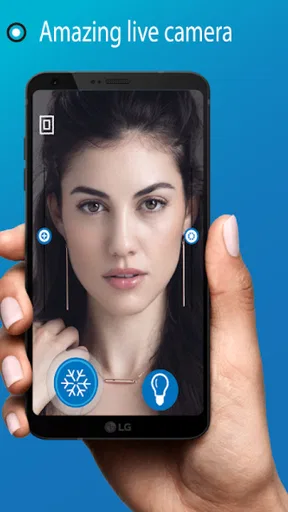
What sets this app apart from just using your front-facing camera, you ask? Well, for starters, the app offers a zoom function. This is perfect for those close-up inspections when you're trying to apply eyeliner or check for that annoying piece of spinach stuck in your teeth. Just pinch to zoom, and you're good to go.
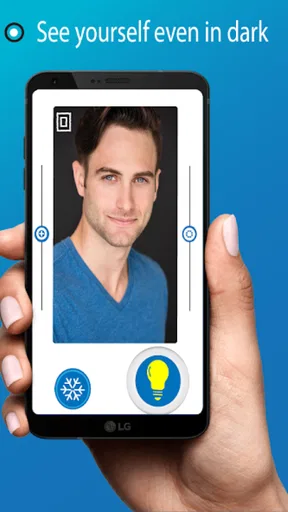
Another nifty feature is the brightness control. Ever tried using your phone camera as a mirror in a dimly lit room? Not ideal, right? With this app, you can easily adjust the brightness to get a clearer view. The app also includes a freeze frame option. Need to pause and inspect without holding your phone steady? Just tap the freeze button, and your reflection stays put.
Using the Mirror App in Daily Life
So, how does it hold up in real-world use? Honestly, it’s pretty darn handy. I found myself using it during coffee breaks at work to touch up my lipstick and even in the car (parked, of course) to check my hair before heading into a meeting. It’s like having a pocket-sized vanity mirror without the bulk.
The app’s interface is intuitive, and switching between features is a seamless experience. The zoom and brightness controls are responsive, and the freeze frame option is surprisingly useful. I didn’t experience any lag or technical glitches during my time using it, which is always a plus.
A Few Considerations
While the app is generally a joy to use, it's worth mentioning a couple of things. The app relies on your phone's front camera, so the quality of your reflection will depend on your device's camera quality. On older models, the image might not be as crisp.
Also, while the app is free, there are some in-app purchases available. These aren’t essential for basic use, but they do offer additional features like no ads and more advanced zoom capabilities.
Choosing it over familiar alternatives
Compared with opening the regular camera app, a dedicated mirror is appealing when I want the controls and view arranged for checking my reflection rather than taking a photo. A compact mirror still wins when I need a quick glance without unlocking a phone, and a real magnifying mirror is better for careful grooming at home. I see this app in the middle: more adjustable than a basic compact, more convenient to carry than a vanity mirror, but dependent on the phone’s camera and battery.
It is particularly suited to people who already carry their phone everywhere and often want a fast check before a social plan, a presentation, or a meal. It is less compelling for someone who rarely touches up away from home, dislikes using a front camera, or needs highly accurate color judgment. For foundation matching or detailed makeup work, I would trust consistent natural light and a proper mirror more than a brightened screen.
Small habits that make the controls more useful
One practical workflow is to start with the phone held at arm’s length, check the whole face, and then use magnification only for the detail you are fixing. That prevents the close view from becoming the only impression you use to judge the result. Brightness is best treated as a way to make the display easier to see; changing it does not change the room’s light on your face, so I would avoid using a very bright screen as the sole guide to color.
The freeze control also has a specific role: it can hold a view for inspection, but a still image cannot show what changed after you moved your hair or adjusted makeup. I would use it to pause and examine, then return to the live view for a final check. These small steps make the app more useful without expecting it to do the work of a dedicated mirror or good lighting.
Who will get the most from it
I would recommend trying it if you want an uncomplicated mirror option in your bag without carrying another object. The strongest case is a brief check in a place where a normal mirror is inconvenient, especially when magnification or brightness adjustment is more useful than a plain camera preview. The purchase options are worth approaching selectively: if the free version already covers quick checks, there is no reason to buy anything just because the option exists.
If you need a detailed routine, a stable hands-free setup, or dependable color evaluation, I would choose a physical mirror and suitable lighting instead. A phone can also be less comfortable to hold while applying makeup, and a larger view does not automatically mean a more accurate one. Those are meaningful limits, not deal-breakers for a tool meant for short, on-the-go checks.
For anyone wondering whether it is complicated to use, the controls described in my experience are straightforward: adjust brightness or zoom when needed, and use the freeze option to pause the view. If the display does not look right, improving the light and holding the phone steady are sensible first steps. That keeps expectations realistic and helps make the app useful in the settings where a phone mirror makes the most sense.
The Final Word
In a world where convenience is key, the Mirror App - Makeup Mirror is a fantastic tool to have at your fingertips. It’s practical, easy to use, and does exactly what it promises. Whether you’re a makeup enthusiast or just need a reliable mirror on the go, this app is worth checking out. So next time you find yourself mirror-less, give this app a spin—you might just love the convenience it brings to your daily routine.
Privacy and Permissions
See what permissions an app requests and how it handles your data.
- Phone
- read phone status and identity
- Photos/Media/Files
- read the contents of your USB storage, modify or delete the contents of your USB storage
- Storage
- read the contents of your USB storage, modify or delete the contents of your USB storage
- Camera
- take pictures and videos
- Wi-Fi connection information
- view Wi-Fi connections
- Device ID & call information
- read phone status and identity
- Other
- view network connections, full network access, control vibration, prevent device from sleeping, Google Play license check
Verdict
Strengths of Mirror App - Makeup Mirror
- High-quality mirror resolution.
- Simple and intuitive interface.
- Zoom feature for close-ups.
- Brightening function for dark environments.
- Fast loading time and smooth performance.
Limitations of Mirror App - Makeup Mirror
- Ads can be intrusive at times.
- Limited features in free version.
- Requires camera permissions.
- No offline usage capabilities.
- Battery drain with prolonged use.
Other Releases by o16i Apps
View All
Glitter Wallpapers For Girls
Personalization4.8

Send My Location - GPS Tracker
Maps & Navigation4.5

Beauty Camera: Selfie Editor
Beauty4.1

Volume Booster:Sound Amplifier
Music & Audio4.5
Similar Picks in This Category
View All
Beauty Makeup Editor & Camera
Photo & Video Editors - Instant Solution4.7

Perfect365: Face Makeup Editor
Perfect365, Inc.3.5

Mirror Plus - HD Mirror app
Digitalchemy, LLC4.8

Cute Lock Screen & Wallpapers
Prometheus Interactive LLC4.6

HD Camera for Android
One Music Player4.5

Phone Mirror app - True Mirror
Cards4.6
Frequently Asked Questions
What is the Mirror App - Makeup Mirror, and how does it work?
The Mirror App - Makeup Mirror transforms your smartphone into a virtual mirror, utilizing the front-facing camera. It enhances the image with adjustable brightness and zoom features, making it ideal for makeup application or quick checks. The app aims to offer a convenient and portable solution for on-the-go grooming needs.
Is the Mirror App - Makeup Mirror free to use?
The app is available for free with basic features. However, it may offer in-app purchases or premium options that unlock additional functionalities, such as ad-free usage or advanced lighting adjustments. Users can decide whether to stick with the free version or explore paid enhancements based on their needs.
Does the Mirror App - Makeup Mirror require internet access?
No, the app does not require an internet connection to function. It uses your device’s camera, so it works offline. However, internet access might be needed for downloading updates or accessing certain features if they are cloud-based or require online verification.
How does the app handle privacy and security concerns?
The Mirror App - Makeup Mirror prioritizes user privacy by not storing any images or videos taken during its use. It only accesses your camera temporarily, ensuring that no personal data is recorded or shared. Users should check the app’s permissions and privacy policy for detailed information.
What devices are compatible with the Mirror App - Makeup Mirror?
The app is compatible with most Android and iOS devices that have a front-facing camera. Users should ensure their device’s operating system is up to date to avoid compatibility issues. The app's performance may vary based on the device’s camera quality and processing power.
